
The UITableView and UICollectionView classes serve table-like and matrix-like layout for content to be displayed on screen. Both components display their data in corresponding UITableViewCell and UICollectionViewCell subclasses. Both components contain mechanisms for reusing a cell, that was initialised earlier and is not visible on the screen, e.g. when user scrolled the content. You can find a nice description and visualisations on that subject here.
Reusing a UITableViewCell – an old way
In order to reuse a cell in a tableView, the cell has to be registered for reuse with an identifier. Usually it is done at the time you configure your views, e.g. in viewDidLoad.
|
1 2 3 4 5 6 7 8 9 |
lazy var tableView: UITableView = UITableView(frame: .zero, style: .plain) override func viewDidLoad() { super.viewDidLoad() tableView.register(MyCell.self, forCellReuseIdentifier: "MyCell") } |
To reuse a cell it has to be dequeued from a tableView. Dequeueing is done by dequeueReusableCell(withIdentifier:for:) method. It dequeues a cell or initialises a new one if none is queued for reuse.
|
1 2 3 4 5 6 7 8 |
override func tableView(_ tableView: UITableView, cellForRowAt indexPath: IndexPath) -> UITableViewCell { guard let cell = tableView.dequeueReusableCell(withIdentifier: "MyCell", for: indexPath) as? MyCell else { return UITableViewCell() } //Configure cell } |
Have you noticed the "MyCell" duplicated in viewDidLoad and tableView(cellForRowAt:)? It felt ugly to me so I have decided to refactor that code, when I repeated it in a few view controllers.
I refactored the code so that a cell I registered for reuse from a stored cellClass and a computed property cellIdentifier.
|
1 2 3 4 5 6 7 8 9 10 |
let cellClass: AnyClass = MyCell.self var cellIdentifier: String { return String(describing: cellClass) } override func viewDidLoad() { super.viewDidLoad() tableView.register(self.cellClass, forCellReuseIdentifier: self.cellIdentifier) } |
Actually, this approach is kinda nice if we have a few cells to be registered for reuse. We can do some functional magic 🔮, like this:
|
1 2 3 4 5 6 7 8 9 10 11 12 13 14 |
let cellClasses: [AnyClass] = [MyCell.self, MyOtherCell.self, UITableViewCell.self] var cellIdentifiers: [String] { return cellClasses.map{ String(describing: $0) } } override func viewDidLoad() { super.viewDidLoad() let reuse = zip(cellClasses, cellIdentifiers) for (cell, cellIdentifier) in reuse { tableView.register(cell, forCellReuseIdentifier: cellIdentifier) } } |
The cellIdentifier property is of course used in tableView(cellForRowAt:). What I still don’t like in this code is that I still have to cast the reused cell to an appropriate type, even though I stored a cellClass 😭.
|
1 2 3 4 5 6 7 8 |
override func tableView(_ tableView: UITableView, cellForRowAt indexPath: IndexPath) -> UITableViewCell { guard let cell = tableView.dequeueReusableCell(withIdentifier: cellIdentifier, for: indexPath) as? MyCell else { return UITableViewCell() } //Configure cell } |
Finally, my colleague Alek has invented a great solution to my problem!
Extending UITableViewCell
First of all, it is a tedious work to write cellIdentifier property in every view controller. Why not to extend the UITableViewCell?
|
1 2 3 4 5 6 |
public extension UITableViewCell { public static var identifier: String { return String(describing: self) } } |
Then we can further extend a UITableView with a new version of register method to make use of identifier property on a UITableViewCell.
|
1 2 3 4 5 6 7 |
public extension UITableView { public func register(_ cell: UITableViewCell.Type) { register(cell, forCellReuseIdentifier: cell.identifier) } |
But the most beautiful magic 🔮 happens when we extend UITableView with new version of dequeueReusableCell(...) method! It uses generics, takes as an argument a class of a cell, an indexPath and a configure closure to which a cell of desired type (i.e. of CellClass.Type) is passed. No more guard and casting in tableView(cellForRowAt:)! Yuppii 😊!
|
1 2 3 4 5 6 7 8 9 10 11 12 13 14 15 16 |
public func dequeueReusableCell<CellClass: UITableViewCell>(of class: CellClass.Type, for indexPath: IndexPath, configure: ((CellClass) -> Void) = { _ in }) -> UITableViewCell { let cell = dequeueReusableCell(withIdentifier: CellClass.identifier, for: indexPath) if let typedCell = cell as? CellClass { configure(typedCell) } return cell } } |
So now we can easily dequeue a cell of an appropriate type! How neat is that 😀 !?
|
1 2 3 4 5 6 7 8 9 10 |
let cellClass = MyCell.self //... register a cell for reuse func tableView(_ tableView: UITableView, cellForRowAt indexPath: IndexPath) -> UITableViewCell { return tableView.dequeueReusableCell(of: cellClass, for: IndexPath(row: 0, section: 0)) { cell in cell.textLabel?.text = indexPath.description } } |
Wrap up
The presented approach simplifies cell registration for reuse and allows to avoid guard-cell-casting. The same approach can be used for UICollectionView.
What you cannot do with the presented solution is taking cellClass from an array, because a compiler doesn’t know type at compile time.
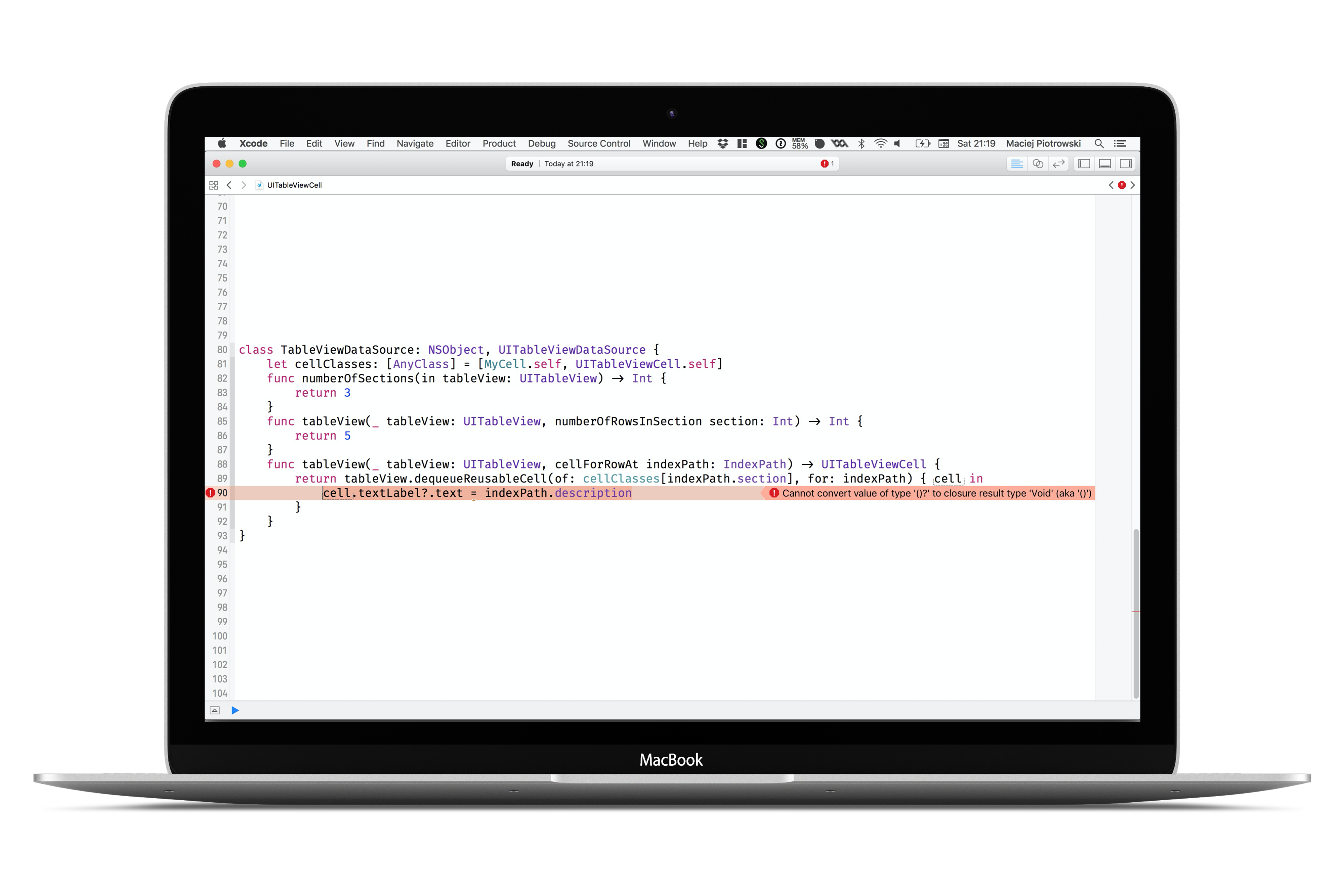
|
1 2 3 4 5 6 7 8 9 10 11 12 13 14 15 16 17 18 |
class TableViewDataSource: NSObject, UITableViewDataSource { let cellClasses: [AnyClass] = [MyCell.self, UITableViewCell.self] func numberOfSections(in tableView: UITableView) -> Int { return 3 } func tableView(_ tableView: UITableView, numberOfRowsInSection section: Int) -> Int { return 5 } func tableView(_ tableView: UITableView, cellForRowAt indexPath: IndexPath) -> UITableViewCell { return tableView.dequeueReusableCell(of: cellClasses[indexPath.section], for: indexPath) { cell in //ERROR: Cannot convert value of type '()?' to closure result type 'Void' (aka '()') cell.textLabel?.text = indexPath.description } } } |
What you can do with that is of course using a switch statement, e.g. over section, to infer a cell type.
|
1 2 3 4 5 6 7 8 9 10 11 12 13 14 15 |
func tableView(_ tableView: UITableView, cellForRowAt indexPath: IndexPath) -> UITableViewCell { switch indexPath.section { case 0: return tableView.dequeueReusableCell(of: MyCell.self, for: indexPath) { cell in cell.textLabel?.text = indexPath.description } default: return tableView.dequeueReusableCell(of: UITableViewCell.self, for: indexPath) { cell in cell.textLabel?.text = indexPath.description } } } |
You can play with the solution by downloading our playgrounds or by grabbing gists from links section.
Hey! Thanks for the article.
You could also link Reusable, I think it’s doing pretty much the same, and it’s nicely packed up in a cocoapod. 🙂
https://github.com/AliSoftware/Reusable
Nice article! I prefer this though:
public extension UITableView {

    public func registerCell(_ cellType: UITableViewCell.Type) {

        self.register(cellType, forCellReuseIdentifier: String(describing: cellType))

    }
    public func dequeueCell(_ cellType: T.Type, for indexPath: IndexPath) -> T where T: UITableViewCell {

        return self.dequeueReusableCell(withIdentifier: String(describing: cellType), for: indexPath) as! T

    }

}